Sent to you by GADET via Google Reader:
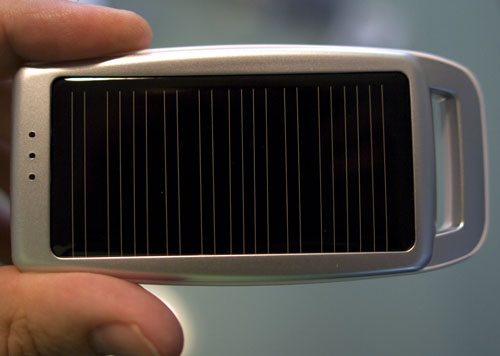
The Arctic C1 is cleverly designed to enable me to recharge any device with a USB adapter (or one of the included adapters) with what is essentially, a spare battery. The twist with this device is the inclusion of a solar cell. I can recharge this battery using the sun (or indoor light) as well as the more conventional USB port.
What's in the Clamshell
First off, it comes in a plastic clamshell. So things did not start off well. I am not a fan of this packaging, it is an unfortunate choice. I wish I could wrestle this gadget from Julie.
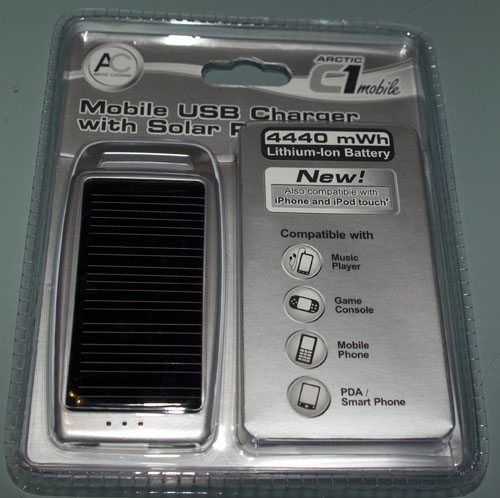
Once you manage to free the charger from its plastic tomb you discover a number of items:
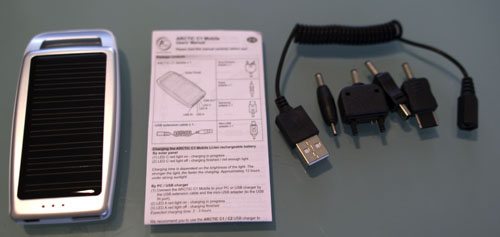
- Charger
- Manual
- Cable with multiple tips
Here is a look at the back of the charger:
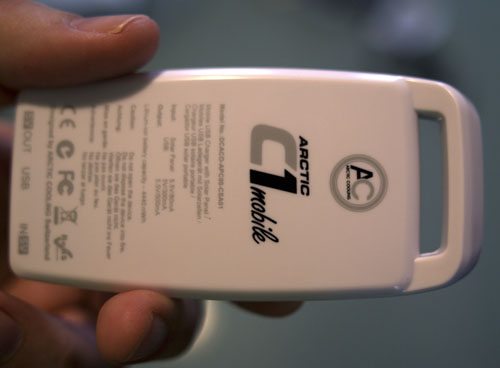
The specs for the Charger:
- 4.3″ by 1.7″ by .47″
- 4440 mWh Li-ion battery
- 5.5 V, 80 mA Solar Panel
- 5.5 V, 300 mA USB input
- 5.5 V, 500 mA USB output
The cable includes adapters for:
- Nokia
- Sony Ericsson
- Samsung
- Mini-USB
However, if you have a USB charging cable for your device, you do not need the included cable or tips.
Charging the Charger
Before you can use the charger, it needs to be charged. There are two ways to charge it. You can let the solar panel charge it, or plug it into a 5V USB power source. The solar option is nice, but can take awhile. To charge it using USB you plug the power source (for example, your computer's USB port) into the Mini USB port of the charger.
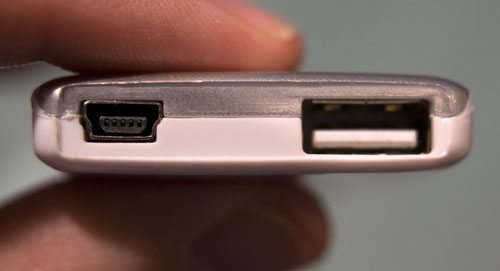
The Mini-USB port on the left is used to charge the charger, the regular USB port on the right is used to plug in the device you want charged. A very simple, and straightforward approach.
The C1 has 3 unlabeled LEDs on the front. These indicate if the battery is charging.
The LEDs are the three dots in the above picture. The manual labels them A, B, and C. In this picture, A is the top LED, and C is the bottom.
When the battery is charging via the Solar Panel, LED C lights up. When you are connected via USB to charge, LED A lights up. So, if you are not sure there is enough light, you can check the third LED. If it is not lit, you either have insufficient light, or the battery is full. I found charging via USB to be a better option. Simply plug it in, and when the first light goes out, your battery is full.
Charging Your Device
The included cables and tips cover a wide variety of devices. Fortunately, most of the devices I use today charge via USB, therefore I just use one for the cables I already have. Plug the cable into the regular USB port (it is clearly marked as OUT on the back of the charger) and attach your device. Now the three LEDs indicate how much charge the Charger's battery has:
- 1 LED 10-30%
- 2 LEDs 30-70%
- 3 LEDs 70-100%
I have used this to successfully charge multiple Android phones, an iPod Touch and an iPod Nano. I have had no issue with it, and it is quite handy. Besides packaging, my only complaint is the battery size. I would definitely be interested in a version with a larger battery. Even fully charged, it will not fully recharge my Droid X, but it is a great way to keep my phone going in a pinch. This has earned a permanent spot in my laptop case.
Filed in categories: Gear, Reviews
Tagged: Battery, Charger, Solar
Arctic C1 Mobile Portable Universal Charger Review originally appeared on The Gadgeteer on February 10, 2011 at 12:00 pm.
Things you can do from here:
- Subscribe to The Gadgeteer using Google Reader
- Get started using Google Reader to easily keep up with all your favorite sites
